

 149.6K
 15.1K
15.1K 172
172 67
67UPDATED as of December 5, 2023...
* Made some changes to better handle multiple simultaneous incoming connection.
How It Works
When a TCPIPClient connects to the TCPIPServer, the server sends the new client information about the clients that are already connected. It then tells those existing clients that a new client has arrived. At that point, each client has a list of the other connected clients, along with useful details such as IP address, user name, computer name, and the connection ID assigned by the server.
When you choose one or more TCPIPClients and send a text message, the message is packaged into packets and sent to the TCPIPServer. The server then redirects those packets to the correct client or clients. It knows where to send them because the idTo field in the packet identifies the target connection.
/****************************************************************/
//prepare the start packet
xdata.Packet_Type = (UInt16)PACKETTYPES.TYPE_Message;
xdata.Data_Type = (UInt16)PACKETTYPES_SUBMESSAGE.SUBMSG_MessageStart;
xdata.Packet_Size = 16;
xdata.maskTo = 0;

// Set this so server will re-direct this message to the connected client.
// If it's '0' then it will only go to the server.
xdata.idTo = (uint)clientsHostId;

// Set this so the client who is getting your message will know who it's from.
xdata.idFrom = (uint)MyHostServerID;
Note: In this example, messages are routed through the TCPIPServer. That means data travels from the sending TCPIPClient to the server, and then from the server to the destination client. This is simple and reliable, but it is not the most efficient design for high-volume traffic.
A more advanced approach would be to use the server only as a rendezvous point: clients could connect to the server, discover each other, exchange connection details, and then communicate directly with one another. That approach can reduce server traffic, but it also adds complexity around connection setup, routing, and firewall/NAT issues. For this article, I chose the relay-through-server model because it keeps the design easier to understand and implement.
File Transfer Support
This sample does more than send text messages — it also supports file transfer.
Drag and drop one or more files onto the blue File Drop area and the client will package the data into packets, send it through the TCPIPServer, and deliver it to the selected client. The transfer is handled using the same packet framework described throughout this article, including packet types for file start, file chunk, and file end.
If you are building an internal messenger, shop-floor utility, admin tool, or peer-to-peer style business app, this part of the sample may be especially useful.
Introduction
This solution includes three projects: TCPIPServer, TCPIPClient, and a shared CommonClassLibs project that contains packet definitions, common functions, and enumerations used by both sides.
The original sample was built with Microsoft Visual Studio 2015 and .NET Framework 4.5. Although the code reflects that era, the underlying approach is still useful for understanding multi-client TCP/IP communication, packet routing, and packet reassembly.
The server is configured to listen on port 9999, so Windows may ask you to allow that port through the firewall the first time you run the application.
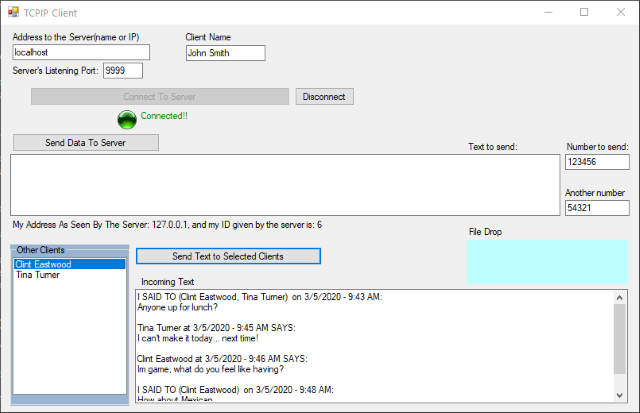
TCPIPClient running on a workstation. You can launch multiple client instances across a network and exchange messages or files through the server.
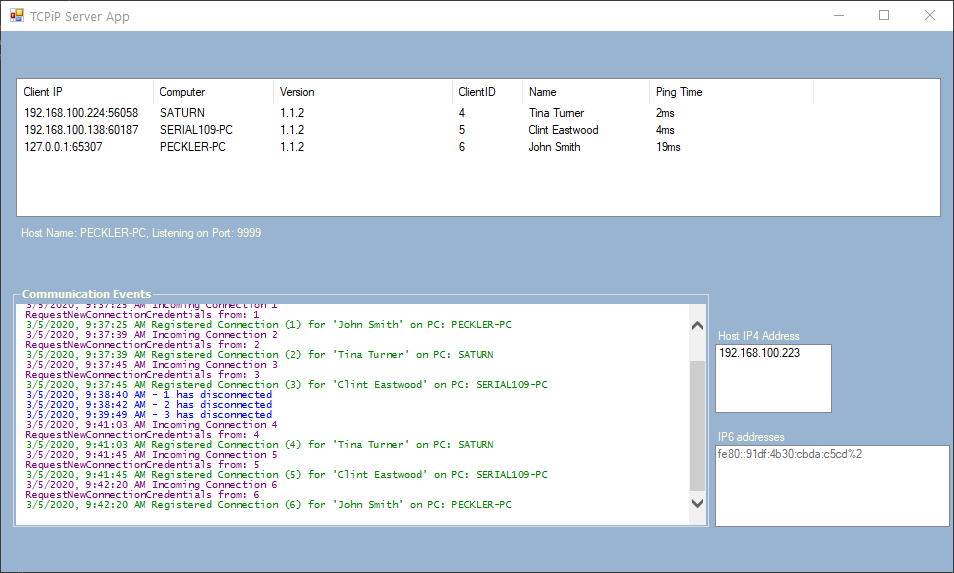
TCPIPServer showing connected clients and server-side activity. The event viewer makes it easy to watch connections, packet flow, and message handling in real time.
Background
One common need in networked desktop applications is real-time communication between users who are running the same software at the same time. For example, if multiple users are viewing or editing shared data, it is often useful for the application to notify others when changes are being made so work is not duplicated or overwritten.
This article demonstrates a classic TCP/IP server design that accepts multiple client connections and processes the packet data sent by those clients. Once packets are received and reassembled, the server can handle them locally, forward them to a specific client, or broadcast them to multiple connected clients.
This design can also be pushed further. The server can act as a rendezvous point, letting connected clients learn about one another and exchange enough information to communicate more directly. One example of that idea is my GComm (Group Communicator) application, shown below. It was built for sending files and rich-text messages to one or more users on a network, and it uses the same core packet handling approach described in this article.

The nuts and bolts are described below...
Using the Code
The TCPIPServer Program
Let me preface by saying that in this example, I'm using a fixed packet size which is inefficient since typically most of the packet space won't be used, but as you will see it's not the end of the world.... as pointed out by a commenter using 'length prefixing' would be the best way... in this case the user would stuff in the size of the packet as well as a type so you would then just assemble the tcpip chunks to that length and cast the whole thing to its original state.
Let's have a look at the server side of the TCPIPServer project... the main purpose of this application is to listen for and connect to client connections. We have a set of global variables for the project:
/*******************************************************/
/// <summary>
/// TCPiP server
/// </summary>
Server svr = null;

private Dictionary<int, MotherOfRawPackets> dClientRawPacketList = null;
private Queue<FullPacket> FullPacketList = null;
static AutoResetEvent autoEvent;//mutex
static AutoResetEvent autoEvent2;//mutex
private Thread DataProcessThread = null;
private Thread FullPacketDataProcessThread = null;
/*******************************************************/
-
The '
Server' is the TCP layer class that establishes a Socket that listens on a port for incoming client connection and gives up the raw data packets to the interface via an Event callback... it also maintains a few items of information on each client and note a defined Packet class that contains a data buffer of 1024 bytes.C#private Socket _UserSocket; private DateTime _dTimer; private int _iClientID; private string _szClientName; private string _szStationName; private UInt16 _UserListentingPort; private string _szAlternateIP; private PingStatsClass _pingStatClass; /// <summary> /// Represents a TCP/IP transmission containing the socket it is using, the clientNumber /// (used by server communication only), and a data buffer representing the message. /// </summary> private class Packet { public Socket CurrentSocket; public int ClientNumber; public byte[] DataBuffer = new byte[1024]; /// <summary> /// Construct a Packet Object /// </summary> /// <param name="sock">The socket this Packet is being used on.</param> /// <param name="client">The client number that this packet is from.</param> public Packet(Socket sock, int client) { CurrentSocket = sock; ClientNumber = client; } }
-
The '
dClientRawPacketList' is aDictionarythat handles each clients raw data packets. As a client attaches to the server, the server creates and assigns a unique integer value(starting at 1) to each client... aDictionaryentry is made for that client where the Key value in theDictionaryis the unique value. As those clients fire data packets to the server, it collects that clients packets in the dictionary'sMotherOfRawPacketsclass which manages a queue type list of classes calledRawPackets.C#public class RawPackets { public RawPackets(int iClientId, byte[] theChunk, int sizeofchunk) { _dataChunk = new byte[sizeofchunk]; //create the space _dataChunk = theChunk; //ram it in there _iClientId = iClientId; //save who it came from _iChunkLen = sizeofchunk; //hang onto the space size } public byte[] dataChunk { get { return _dataChunk; } } public int iClientId { get { return _iClientId; } } public int iChunkLen { get { return _iChunkLen; } } private byte[] _dataChunk; private int _iClientId; private int _iChunkLen; }
- The '
FullPacketList' is a Queue type list. Its purpose is to hold onto the incoming packets in the order by which they arrived. If you have 10 client connections all firing data at the server, the server'sDataProcessingThreadfunction will assemble those packets into full packets and store them into this list for processing shortly thereafter. - There are 2 AutoEvent mutexes used in packet assembly threads,
autoEventandautoEvent2(sorry for the generic names). These allow those threaded function to efficiently sleep when data is being processed. - As mentioned above, the '
DataProcessThread' and the 'FullPacketDataProcessThread' are 2 threads that work hand in hand to assemble data packets in the exact order they were sent.
As the TCPIPServer application starts up, we initialize the above defined variables:
private void StartPacketCommunicationsServiceThread()
{
                    try
    {
                    //Packet processor mutex and loop
        autoEvent = new AutoResetEvent(false); //the RawPacket data mutex
        autoEvent2 = new AutoResetEvent(false);//the FullPacket data mutex
        DataProcessThread = new Thread(new ThreadStart(NormalizeThePackets));
        FullPacketDataProcessThread = new Thread(new ThreadStart(ProcessRecievedData));

                    //Lists
        dClientRawPacketList = new Dictionary<int, MotherOfRawPackets>();
        FullPacketList = new Queue<FullPacket>();

                    //Create HostServer
        svr = new Server();

        svr.Listen(MyPort);//MySettings.HostPort);
        svr.OnReceiveData += new Server.ReceiveDataCallback(OnDataReceived);
        svr.OnClientConnect += new Server.ClientConnectCallback(NewClientConnected);
        svr.OnClientDisconnect += new Server.ClientDisconnectCallback(ClientDisconnect);

        DataProcessThread.Start();
        FullPacketDataProcessThread.Start();
        OnCommunications($"TCPiP Server is listening on port {MyPort}", INK.CLR_GREEN);
    }
                    catch(Exception ex)
    {
                    var exceptionMessage = (ex.InnerException != null) ?
                                ex.InnerException.Message : ex.Message;
        OnCommunications($"EXCEPTION: TCPiP FAILED TO START, exception: {exceptionMessage}", INK.CLR_RED);
    }
}
Notice the two worker threads, NormalizeThePackets and ProcessRecievedData (yes, the second one is misspelled in the original code). These two threads work together to turn raw incoming TCP data into complete application packets.
As data arrives from the socket layer, it may not line up neatly with the packet boundaries used by the application. TCP guarantees that bytes arrive in order and without corruption, but it does not guarantee that one send operation on one side will be received as one complete chunk on the other side. A single 1024-byte application packet may arrive in several smaller pieces, or several packets may arrive together in one larger read.
The job of NormalizeThePackets is to collect those incoming byte chunks from each connected client and rebuild them into full 1024-byte packets. It waits on autoEvent.WaitOne() until new raw data is available. When data arrives, the thread examines each client's entry in dClientRawPacketList, appends the incoming chunks, and keeps track of any leftover bytes that do not yet make up a complete packet. Whenever a full 1024-byte packet has been assembled, it is added to the FullPacketList queue.
At that point, NormalizeThePackets signals the second thread by calling autoEvent2.Set(). The ProcessRecievedData thread then wakes up, removes completed packets from FullPacketList, inspects the packet type, and dispatches the data to the correct handler. In other words, the first thread is responsible for reassembly, and the second thread is responsible for interpretation and processing.
This separation keeps the design clean: one thread deals with the low-level problem of reconstructing full packets from a TCP byte stream, while the other deals with the higher-level meaning of those packets once they are complete.
Note: TCP guarantees ordered, reliable delivery of bytes, which is why this reconstruction approach works. However, TCP is still a stream protocol, so the receiving side must reassemble the incoming data into the original packet boundaries used by the application.
private void NormalizeThePackets()
{
                    if (svr == null)
                    return;

                    while (svr.IsListening)
    {
        autoEvent.WaitOne();//wait at mutex until signal

                    /**********************************************/
                    lock (dClientRawPacketList)//http://www.albahari.com/threading/part2.aspx#_Locking
        {
                    foreach (MotherOfRawPackets MRP in dClientRawPacketList.Values)
            {
                    if (MRP.GetItemCount.Equals(0))
                    continue;
                    try
                {
                    byte[] packetplayground = new byte[11264];//good for
                    //10 full packets(10240) + 1 remainder(1024)
                    RawPackets rp;

                    int actualPackets = 0;

                    while (true)
                    {
                    if (MRP.GetItemCount == 0)
                    break;

                    int holdLen = 0;

                    if (MRP.bytesRemaining > 0)
                            Copy(MRP.Remainder, 0, packetplayground, 0, MRP.bytesRemaining);

                        holdLen = MRP.bytesRemaining;

                    for (int i = 0; i < 10; i++)//only go through a max of
                    //10 times so there will be room for any remainder
                        {
                            rp = MRP.GetTopItem;//dequeue

                            Copy(rp.dataChunk, 0, packetplayground, holdLen, rp.iChunkLen);

                            holdLen += rp.iChunkLen;

                    if (MRP.GetItemCount.Equals(0))//make sure there is more
                    //in the list before continuing
                    break;
                        }

                        actualPackets = 0;

                    if (holdLen >= 1024)//make sure we have at least one packet in there
                        {
                            actualPackets = holdLen / 1024;
                            MRP.bytesRemaining = holdLen - (actualPackets * 1024);

                    for (int i = 0; i < actualPackets; i++)
                            {
                                byte[] tmpByteArr = new byte[1024];
                                Copy(packetplayground, i * 1024, tmpByteArr, 0, 1024);
                    lock (FullPacketList)
                                    FullPacketList.Enqueue(new FullPacket
                                               (MRP.iListClientID, tmpByteArr));
                            }
                        }
                    else
                        {
                            MRP.bytesRemaining = holdLen;
                        }

                    //hang onto the remainder
                        Copy(packetplayground, actualPackets * 1024, MRP.Remainder,
                    0, MRP.bytesRemaining);

                    if (FullPacketList.Count > 0)
                            autoEvent2.Set();

                    }//end of while(true)
                }
                    catch (Exception ex)
                {
                    MRP.ClearList();//pe 03-20-2013
                    string msg = (ex.InnerException == null) ?
                                  ex.Message : ex.InnerException.Message;

                    OnCommunications
                       ("EXCEPTION in  NormalizeThePackets - " + msg, INK.CLR_RED);
                }
            }//end of foreach (dClientRawPacketList)
        }//end of lock
                    /**********************************************/
                    if (ServerIsExiting)
                    break;
    }//Endof of while(svr.IsListening)

    Debug.WriteLine("Exiting the packet normalizer");
    OnCommunications("Exiting the packet normalizer", INK.CLR_RED);
}
Now the ProcessRecievedData function:
private void ProcessReceivedData()
{
                    if (svr == null)
                    return;

                    while (svr.IsListening)
    {
        autoEvent2.WaitOne();//wait at mutex until signal

                    try
        {
                    while (FullPacketList.Count > 0)
            {
                FullPacket fp;
                    lock (FullPacketList)
                    fp = FullPacketList.Dequeue();
                    UInt16 type = (ushort)(fp.ThePacket[1] << 8 | fp.ThePacket[0]);
                    switch (type)//Interrogate the first 2 Bytes to see what the packet TYPE is
                {
                    case (UInt16)PACKETTYPES.TYPE_MyCredentials:
                        {
                            PostUserCredentials(fp.iFromClient, fp.ThePacket);
                            SendRegisteredMessage(fp.iFromClient, fp.ThePacket);
                        }
                    break;
                    case (UInt16)PACKETTYPES.TYPE_CredentialsUpdate:
                    break;
                    case (UInt16)PACKETTYPES.TYPE_PingResponse:
                        UpdateTheConnectionTimers(fp.iFromClient, fp.ThePacket);
                    break;
                    case (UInt16)PACKETTYPES.TYPE_Close:
                        ClientDisconnect(fp.iFromClient);
                    break;
                    case (UInt16)PACKETTYPES.TYPE_Message:
                        {
                            AssembleMessage(fp.iFromClient, fp.ThePacket);
                        }
                    break;
                    default:
                        PassDataThru(type, fp.iFromClient, fp.ThePacket);
                    break;
                }
            }
        }
                    catch (Exception ex)
        {
                    try
            {
                    string msg = (ex.InnerException == null) ?
                              ex.Message : ex.InnerException.Message;
                OnCommunications($"EXCEPTION in  ProcessRecievedData - {msg}", INK.CLR_RED);
            }
                    catch { }
        }

                    if (ServerIsExiting)
                    break;
    }

                    string info2 = string.Format("AppIsExiting = {0}", ServerIsExiting.ToString());
                    string info3 = string.Format("Past the ProcessRecievedData loop");

    Debug.WriteLine(info2);
    Debug.WriteLine(info3);

                    try
    {
        OnCommunications(info3, INK.CLR_RED);
    }
                    catch { }

                    if (!ServerIsExiting)
    {
        OnCommunications("SOMETHING CRASHED", INK.CLR_RED);
    }
}
Ok, we have described how data is received from the clients on the TCPIP server application! Let's look at the packet of data that is transmitted... both the server and client have this packet defined in the CommonClassLib DLL... I decided that I would just create a generic class called PACKET_DATA of a fixed size of a computer friendly number of 1024. You can create as many classes as you like. Just make sure that they are 1024 bytes. Note that that matches the size of the Packet class described in the Service class above.
So! For each full packet that comes in and is EnQueued in the FullPacketList, this is the class we are getting.
The very first variable is an unsigned short(UInt16) called Packet_Type. If we interrogate the first 2 bytes as seen in the ProcessRecievedData function above, we can then figure out what the rest of the data in the class contains.
[StructLayout(LayoutKind.Sequential, Pack = 1)]
public class PACKET_DATA
{
                    /****************************************************************/
                    //HEADER is 18 BYTES
                    public UInt16 Packet_Type;  //TYPE_??
                    public UInt16 Packet_Size;
                    public UInt16 Data_Type;    // DATA_ type fields
                    public UInt16 maskTo;        // SENDTO_MY_SHUBONLY and the like.
                    public UInt32 idTo;            // Used if maskTo is SENDTO_INDIVIDUAL
                    public UInt32 idFrom;        // Client ID value
                    public UInt16 nAppLevel;
                    /****************************************************************/

                    public UInt32 Data1;        //miscellaneous information
                    public UInt32 Data2;        //miscellaneous information
                    public UInt32 Data3;        //miscellaneous information
                    public UInt32 Data4;        //miscellaneous information
                    public UInt32 Data5;        //miscellaneous information

                    public Int32 Data6;         //miscellaneous information
                    public Int32 Data7;         //miscellaneous information
                    public Int32 Data8;         //miscellaneous information
                    public Int32 Data9;         //miscellaneous information
                    public Int32 Data10;        //miscellaneous information

                    public UInt32 Data11;       //miscellaneous information
                    public UInt32 Data12;       //miscellaneous information
                    public UInt32 Data13;       //miscellaneous information
                    public UInt32 Data14;       //miscellaneous information
                    public UInt32 Data15;       //miscellaneous information

                    public Int32 Data16;        //miscellaneous information
                    public Int32 Data17;        //miscellaneous information
                    public Int32 Data18;        //miscellaneous information
                    public Int32 Data19;        //miscellaneous information
                    public Int32 Data20;        //miscellaneous information

                    public UInt32 Data21;       //miscellaneous information
                    public UInt32 Data22;       //miscellaneous information
                    public UInt32 Data23;       //miscellaneous information
                    public UInt32 Data24;       //miscellaneous information
                    public UInt32 Data25;       //miscellaneous information

                    public Int32 Data26;        //miscellaneous information
                    public Int32 Data27;        //miscellaneous information
                    public Int32 Data28;        //miscellaneous information
                    public Int32 Data29;        //miscellanious information
                    public Int32 Data30;        //miscellaneous information

                    public Double DataDouble1;
                    public Double DataDouble2;
                    public Double DataDouble3;
                    public Double DataDouble4;
                    public Double DataDouble5;

                    /// <summary>
    /// Long value1
    /// </summary>
    public Int64 DataLong1;
                    /// <summary>
    /// Long value2
    /// </summary>
    public Int64 DataLong2;
                    /// <summary>
    /// Long value3
    /// </summary>
    public Int64 DataLong3;
                    /// <summary>
    /// Long value4
    /// </summary>
    public Int64 DataLong4;

                    /// <summary>
    /// Unsigned Long value1
    /// </summary>
    public UInt64 DataULong1;
                    /// <summary>
    /// Unsigned Long value2
    /// </summary>
    public UInt64 DataULong2;
                    /// <summary>
    /// Unsigned Long value3
    /// </summary>
    public UInt64 DataULong3;
                    /// <summary>
    /// Unsigned Long value4
    /// </summary>
    public UInt64 DataULong4;

                    /// <summary>
    /// DateTime Tick value1
    /// </summary>
    public Int64 DataTimeTick1;

                    /// <summary>
    /// DateTime Tick value2
    /// </summary>
    public Int64 DataTimeTick2;

                    /// <summary>
    /// DateTime Tick value1
    /// </summary>
    public Int64 DataTimeTick3;

                    /// <summary>
    /// DateTime Tick value2
    /// </summary>
    public Int64 DataTimeTick4;

                    /// <summary>
    /// 300 Chars
    /// </summary>
    [MarshalAs(UnmanagedType.ByValArray, SizeConst = 300)]
                    public Char[] szStringDataA = new Char[300];

                    /// <summary>
    /// 300 Chars
    /// </summary>
    [MarshalAs(UnmanagedType.ByValArray, SizeConst = 300)]
                    public Char[] szStringDataB = new Char[300];

                    /// <summary>
    /// 150 Chars
    /// </summary>
    [MarshalAs(UnmanagedType.ByValArray, SizeConst = 150)]
                    public Char[] szStringData150 = new Char[150];

                    //18 + 120 + 40 + 96 + 600 + 150 = 1024
}
Creating an enum and defining a set of packet types allows us to know what the data is that's coming in from a client.
public enum PACKETTYPES
{
    TYPE_Ping = 1,
    TYPE_PingResponse = 2,
    TYPE_RequestCredentials = 3,
    TYPE_MyCredentials = 4,
    TYPE_Registered = 5,
    TYPE_HostExiting = 6,
    TYPE_ClientData = 7,
    TYPE_ClientDisconnecting = 8,
    TYPE_CredentialsUpdate = 9,
    TYPE_Close = 10,
    TYPE_Message = 11,
    TYPE_MessageReceived = 12,
    TYPE_FileStart = 13,
    TYPE_FileChunk = 14,
    TYPE_FileEnd = 15,
    TYPE_DoneRecievingFile = 16
}
Again, this PACKETTYPES enum is also part of the CommonClassLib DLL that are shared between the TCPIPServer and TCPIPClient programs.
The TCPIPClient Program
The TCPIPClient program is almost identical to the server as far as how it processes data packets but it only has to worry about what it's getting from the server, rather than several TCP streams from several clients.
The TCPIPClient also has a client side version of the TCP layer that does a connect to attach to the listening server.
/*******************************************************/
private Client client = null;//Client Socket class

private MotherOfRawPackets HostServerRawPackets = null;
static AutoResetEvent autoEventHostServer = null;//mutex
static AutoResetEvent autoEvent2;//mutex
private Thread DataProcessHostServerThread = null;
private Thread FullPacketDataProcessThread = null;
private Queue<FullPacket> FullHostServerPacketList = null;
/*******************************************************/
Here is a client side example of the client responding to a TYPE_Ping message from the server:
private void ReplyToHostPing(byte[] message)
{
                    try
    {
        PACKET_DATA IncomingData = new PACKET_DATA();
        IncomingData = (PACKET_DATA)PACKET_FUNCTIONS.ByteArrayToStructure
                       (message, typeof(PACKET_DATA));

                    /***********************************************************************************/
                    //calculate how long that ping took to get here
        TimeSpan ts = (new DateTime(IncomingData.DataLong1)) - (new DateTime(ServerTime));
        Console.WriteLine($"{GeneralFunction.GetDateTimeFormatted}: Ping From Server to client: {0:0.##}ms");
                    /***********************************************************************************/

        ServerTime = IncomingData.DataLong1;// Server computer's current time!

        PACKET_DATA xdata = new PACKET_DATA();

        xdata.Packet_Type = (UInt16)PACKETTYPES.TYPE_PingResponse;
        xdata.Data_Type = 0;
        xdata.Packet_Size = 16;
        xdata.maskTo = 0;
        xdata.idTo = 0;
        xdata.idFrom = 0;

        xdata.DataLong1 = IncomingData.DataLong1;

        byte[] byData = PACKET_FUNCTIONS.StructureToByteArray(xdata);

        SendMessageToServer(byData);

        CheckThisComputersTimeAgainstServerTime();
    }
                    catch (Exception ex)
    {
                    string exceptionMessage = (ex.InnerException != null) ?
                                   ex.InnerException.Message : ex.Message;
        Console.WriteLine($"EXCEPTION IN: ReplyToHostPing - {exceptionMessage}");
    }
}
Compiling and Running the Apps in the Solution
To start, compile the CommonClassLibs project. This creates the DLL that the TCPIPServer and the TCPIPClient will need. It contains the classes and enumerations that each side will need along with a few common functions. Make sure that you reference this DLL in the other projects.
Compile the TCPIPServer and the TCPIPClient projects, then run the TCPIPServer... it will likely want to make a rule in the computers firewall to allow port 9999 through so go ahead and allow that. Take note of the computer's IP address on the network:

(If more than one, then it's likely the first one.)
Once it's running, fire up the TCPIPClient application... Set the IP address of the TCPIPServer in the 'Address to the Server' textbox. If you are running this on the same computer using localhost should work. Run this app on as many computers as you like and click the 'Connect to Server' button. If the red indicator turns green, then the connection was made... it turns green when the client gets a TYPE_Registered message from the server.
Points of Interest
I've used this method between applications for years and it's pretty solid!
History
- A rainy November the 15th, 2017 day in Livonia Michigan
 United States